

Colour mode
Read your Overview page
The Overview page is the first thing you see when you sign in. It shows how your site is doing today and lists anything that needs you. Spend a minute here each day.
Before you start
- Money figures are for admins. Moderators do not see them.
- The page only shows what is relevant. A card appears only when there is something to show.
Open the page
- Sign in to your admin.
- Click Overview at the top of the menu if you are not already there.
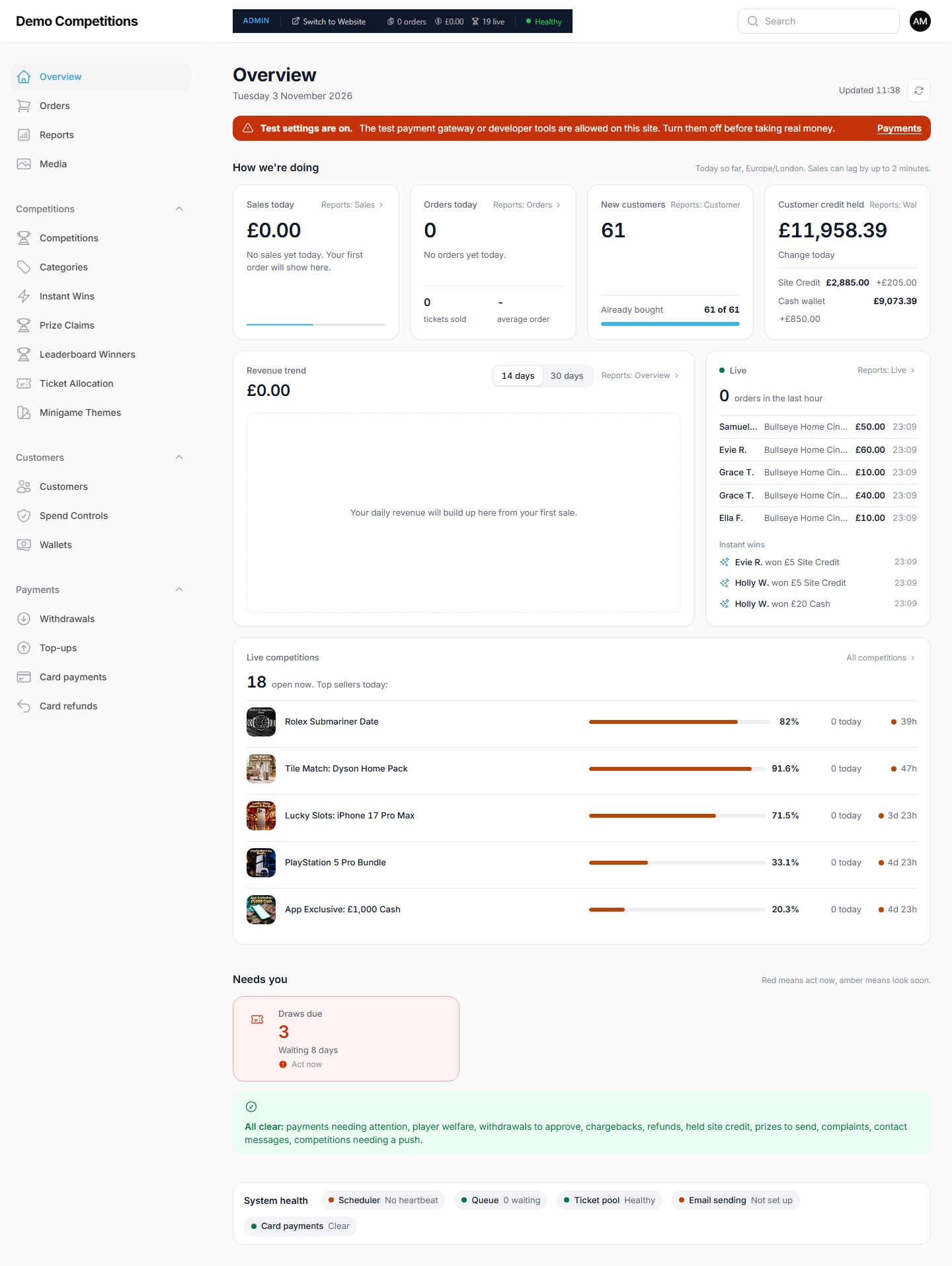
Read each block
How we're doing. Four figures: Sales today, Orders today, New customers and Customer credit held. Customer credit held is the total money your customers hold in their wallets, split into Site Credit and Cash Wallet.
Revenue trend. A chart of your revenue. You can switch between the last 14 days and the last 30 days.
Live. What is happening on your site right now.
Live competitions. The competitions that are on sale at the moment.
Needs you. Cards for things that need a decision from you. Admins can see these:
- Payment failures are high
- Payments needing attention
- Withdrawals to approve
- Refunds
- Chargebacks
- Held Site Credit
- Player welfare
- Draws due
- Competitions needing a push
Complaints, Contact messages and Prizes to send also appear. Admins see them. Moderators see them if their account has access to those areas.
Click a card to go straight to the screen where you deal with it.
System health. Small status chips that show whether the behind-the-scenes parts of your site are working: background jobs, ticket preparation, email sending, email marketing and card payments. If one is not healthy, tell Raffinity.
Look out for the banners
- The holding page is on. Your customers see a holding page instead of your site.
- Test settings are on. The message says the test payment gateway or developer tools are allowed on your site, and to turn them off before taking real money. There is a Payments link in the banner. Ask Raffinity if you are not sure.
What your customers will see
Nothing. The Overview page is only for your team.
Tips
- Start with Needs you and work down it.
- If Draws due shows a competition, see Draws and winners.
- A red or amber chip in System health is worth reporting early, before customers notice.
Common questions
Why can I not see the money figures? Moderators do not see them. Ask an admin.
Why is a card missing from Needs you? Cards only appear when there is something to do, and some are only shown to admins.