

Colour mode
Switch features on and off
You choose which features your site offers to customers. You might want instant wins but not a leaderboard, or a wallet but not top-ups. This guide shows where the switches are and what each one controls. It is for admins only.
Before you start
- Decide which features fit your business. Fewer features means a simpler site for your customers.
- Some features need other things set up first. For example, top-ups need card payments, and the wallet features need your wallet rules.
Choose your features
- Open Help & Tools in the admin menu, then Setup Wizard.
- Go to the step called Choose your features.
- Click the On or Off button beside each feature. The features are grouped as Ways to win, Rewards and Wallet and money.
- Click Save at the top of the wizard.
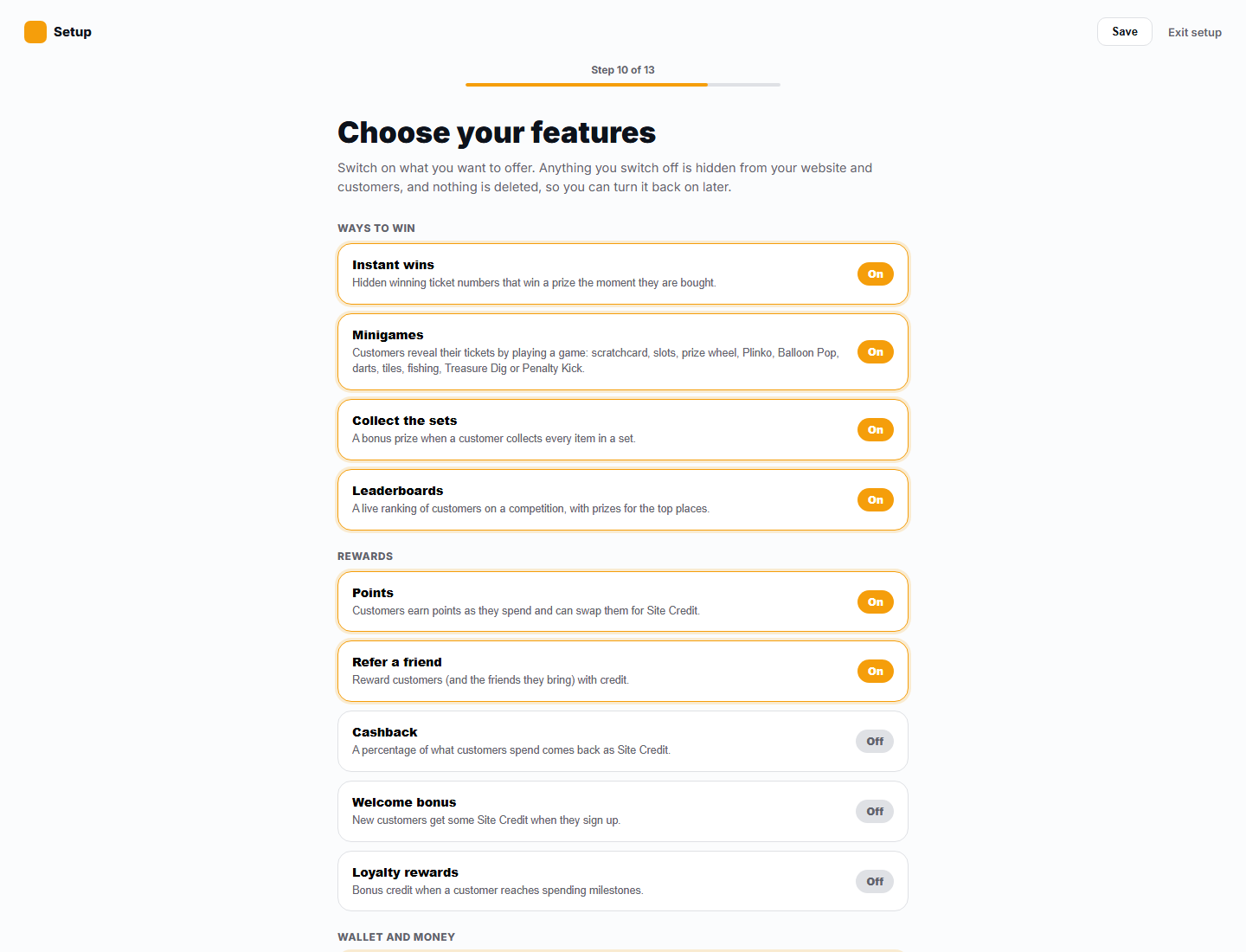
The features you can choose
| Feature | What it controls |
|---|---|
| Instant wins | Instant win prizes on competitions. |
| Minigames | Mini games that reveal an instant win. |
| Collect the sets | Sets of instant wins that earn a prize when completed. |
| Leaderboards | Leaderboards on competitions. |
| Points | Points that customers earn. |
| Refer a friend | The referral programme. |
| Cashback | Cashback on orders. |
| Welcome bonus | A bonus for new customers. |
| Loyalty rewards | Rewards for total spend. |
| Customer wallet | The wallet in customers' accounts. |
| Pay with Site Credit | Paying for tickets with Site Credit at checkout. |
| Top-ups | Customers adding Site Credit by card. |
| Convert cash to Site Credit | Customers moving Cash Wallet money into Site Credit. |
| Withdrawals | Customers taking Cash Wallet money out to their bank. |
Out of the box, Top-ups are off. Withdrawals, Convert cash to Site Credit and Pay with Site Credit are on.
Change the wallet and reward switches in Business Rules
The wallet and reward features also have switches in Settings, then Business Rules, then Wallet Rules. These include points, referrals, cashback, the welcome bonus, loyalty rewards, paying with Site Credit, top-ups, converting cash to Site Credit and withdrawals. Switch them there when you are already setting the rules for them. See Wallets and withdrawals.
What your customers will see
The wizard says it plainly: anything you switch off is hidden from your website and customers, and nothing is deleted, so you can turn it back on later. For example, with Instant wins off, customers do not see instant win panels on competition pages.
Tips
- Switching a feature off hides it from customers. It does not delete anything you have already set up. The related screens in your admin stay visible, so you can still prepare things before you switch the feature on.
- After you switch a feature on, look at your live site to check it shows what you expect.
Common questions
If I switch off Withdrawals, what happens to customers' money? Their Cash Wallet balance stays where it is. They cannot ask to take it out while the feature is off.
Where do I set the rules for the wallet? In Settings, then Business Rules, then Wallet Rules. See Wallets and withdrawals.