

Colour mode
Feature a competition on your home page
You can push a competition to the top of your home page in two ways: as a slide in the banner at the top, or as a spotlight picture card in the competitions grid. Nothing appears in these places unless you switch it on.
Before you start
- The competition needs a good picture. See Add pictures and categories.
- Only competitions that are live show in these places.
Feature one competition
- Open the competition and click the Display & promotion tab.
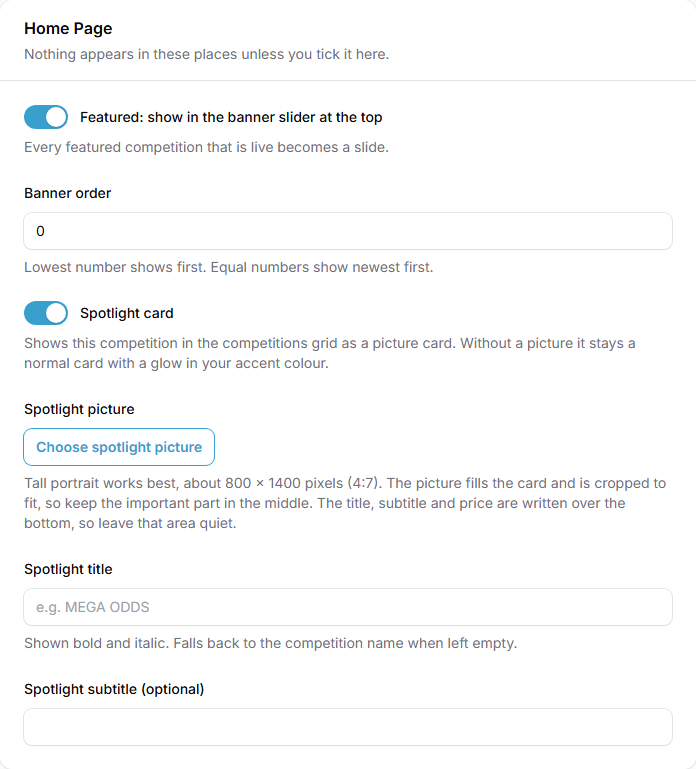
- Under Home Page, switch on Featured: show in the banner slider at the top. Every featured competition that is live becomes a slide.
- Set the Banner order. The lowest number shows first. Equal numbers show newest first.
- To give it a spotlight card, switch on Spotlight card, then fill in:
- Spotlight picture. A tall portrait picture works best, about 800 by 1400 pixels (4 by 7). It is cropped to fit, so keep the important part in the middle. The title, subtitle and price are written over the bottom, so leave that area quiet.
- Spotlight title. Shown bold and italic. If you leave it empty, the competition name is used.
- Spotlight subtitle (optional).
- Click Save changes.
Feature several competitions at once
- In Competitions, tick the competitions in the list.
- Open the bulk actions menu and choose Add to banner, Remove from banner, Make spotlight or Remove spotlight.
The Banner and Spotlight columns in the list show which competitions are already featured.
Leave a competition out of your Meta catalogue
If you use the Meta (Facebook) catalogue, live competitions are added to it by themselves. The Meta (Facebook) catalogue section on the same tab lets you leave one out or use a different picture for adverts.
Make a popup for it
On the competition's edit page, Create popup starts a popup about this competition. The button only shows while the competition is Active.
What your customers will see
Featured competitions become slides in the banner slider at the top of your home page. A spotlight card shows the competition as a picture card in the grid.
Tips
- Do not feature too many at once. A banner with a few strong slides works better than a long list.
- Use banner order to put your best seller first.
Common questions
Why is my featured competition not showing? It must be live. A draft or a competition that has not started will not show.
What if I do not add a spotlight picture? The card stays a normal card, with a glow in your accent colour.